Stock-Alert.AI is perfect for SWING Strategies. Meaning buying low and selling high.
Investment time is typically between 1 and 90 days.
This tutorial is about using Alerts Investment Opportunity in SWING strategies.
From “Investment Opportunity’ tap the alert for the stock you are interested to.
Tap the various Smart Indicators to see details of why this Alert has been produced.
If you want to follow a stock in Stock-Alert.AI, open the section “Watch List” from the main screen.
Select an existing Watchlist or create a new one using the “+” sign.
Select an existing Watchlist or create a new one using the “+” sign.
For exemple use the name “My New Watchlist”.
Use the “+” sign to add the stock you want to follow. You can search by name, symbol or ISIN for the stock to be selected.
Stock-Alert.AI offers more than 28,000 stocks across 31 global exchanges.
After adding the stock on a Watchlist, open the position and go to TP/SL (Take Profit or Stop Loss), the Orange Dot indicates it has not been set yet.
Stock need to be on a Watchlit to add Take Profit and Stock Loss.
Enter a reasonable amount (5% or 10% profit for a few days is already good!).
The app automatically indicates the date of the price you have set.
Stock-Alert.AI monitors your positions. If your target price is reached an alert is generated.
The Alert inform you about the profit, the target price you set and the date of the setting of the target price.
Using that method, over the last 12 years,
of Alerts are in profit.
0%
What NOT to do!
Wait for Stock-Alert.AI to generate a Sell after a Buy.
Exit at fixed date (I.e. 10 or 30 days)
Don't be too greedy (Profit is profit)
Back to Tutorial
How to read an Alert and its Trade Signals.
One of the most important parts of the Alert is the score.
It indicates the accuracy of the Alert.
Tap the Alert to access the Smart Indicators. Typically each Alert contains 8 Indicators. The AI is combining the indicators to generate the Alert.
The first Smart Indicator is the Trade Signals.
Trade Signals is one of the 8 or 9 indicators triggered in this Alert and it contains its own score, indicating the accuracy.
Trade Signals contain the various Financial Indicators that the AI uses to trigger the Alert. These Financial Indicators are similar to the ones used in Quant or Robot trading; Like MACD, RSI… The AI combines them into strategies. Each strategy consists of a Trigger Indicator and several Support Indicators.
Tap the Trade Signals to access the various Financial Indicators.
As an example:
An Alert is triggered by a strategy combining 3 Financial Indicators.
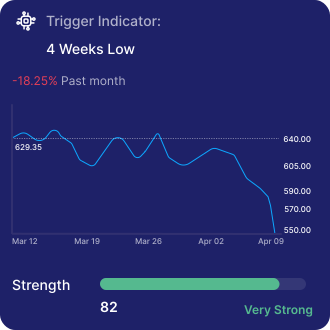
In this example the AI detected that the stock price is at its 4 weeks low. The crossing below the 4 weeks low is about 82. This score indicates the strength of the price crossing.
At the same time, the first Support Indicator detects that the stock is currently in an “Undersold” situation. Indicating that the stock has been sold excessively by the market very recently. The orange curve indicates the trend of the market sell-off.
A third Financial Indicator has been triggered by the AI detecting the current volatility of the Stock.
The volatility of the stock is high, indicating important movement in the market triggered by the sell-off.
Next, AI will call the other 7 Smart Indicators including the back tested data and combine them to generate the Alert and to define the score.
Make the most of the Dashboard.
Your Dashboard includes 2 parts:
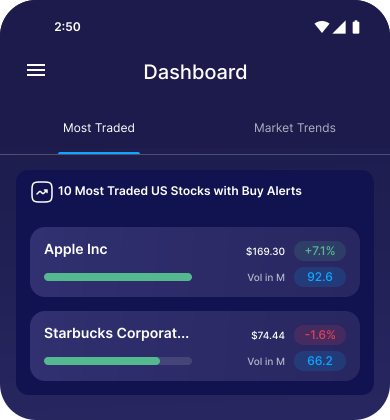
The top 10 most traded US Stocks with Buy and Sell Alerts on the day.
Alert trends.
Most traded US Stocks show Stocks connected to a Buy or Sell Alert with the highest traded volume on that day. This could indicate specific events, news or rumours.
The day volume of trading is indicated in Million.
The second tab of the Dashboard displays the Alert trends by Buy or Sell, Sectors, Regions and Thematics.
Interesting data that might suggest what is happening next in the market. For example if a Thematic (Say: Crypto Currency) is high on “Buy”, the Crypto Stocks might enter bullish territories in the coming days.
Risk Management
Please remember that Risk is Volatility.
Risk management is an essential part of your investment decision.
Stock-Alert.AI factors in the Risk in the Alert and its score.
The App provides you with a risk level ranking from Low, Average, Above Average to High. It considers the S&P 500 as the “Zero” Risk. If a Stock returns “Average” Risk pointing at “25”, it is a “Zero” Risk Stock.
Stock-Alert.AI uses its own AI Algorithm integrating 4 Risk factors:
Beta of the Stock.
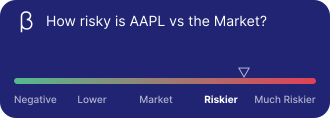
If the Beta is greater than 1, it indicates a Stock’s volatility greater than the overall market (S&P 500). A Beta of less than 1 indicates that a Stock’s price is less volatile than the overall market. A Beta of 1 indicates the Stock moves identically to the overall market and therefore not risky.
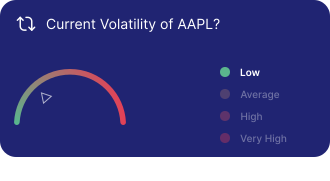
Volatility of the Stock at the moment of the Alert is another important Risk factor.
Annualized Standard Deviation of the price of the Stock. When the spread (Deviance compared to average price) is narrow between trading ranges, the standard deviation is low and therefore, the Stock is less risky.
Market Risk itself. The AI gets its data from the VIX index.VIX is an index created by Chicago Board Options Exchange (CBOE) Global Markets. The VIX shows the market’s expectation of 30-day volatility.
The best way to manage your risk, is to set Take Profit and Stop Loss limits in the App. This function is available in the Alert Details. Note that Take profit and Stop Loss are available only for Stocks on your watchlists.